![How to Remember All Your Passwords (and Why You Actually Shouldn’t) [2026]](https://apiblog.infiry.com/wp-content/uploads/2026/01/Screenshot-From-2026-01-13-16-04-23.png)
Photos at Your Fingertips
Welcome to a new era of managing your photographs! With Infiry, your photos are always neatly organized and easily accessible from anywhere. Our advanced search features help you find exactly what you’re looking for in an instant. Arrange your photos into themed collections and share them effortlessly. Whether you want to download a single photo or an entire collection, Infiry allows you to do it quickly and easily.

What Infiry Excels At

Photo Organization in One Place
Our solution offers businesses and professionals the possibility to have all their photographs securely stored and instantly accessible. No more complicated file transfers between devices – everything is ready to share with colleagues and clients, plus you can quickly find the images you need, saving time and boosting productivity.


Easy and Fast Searching
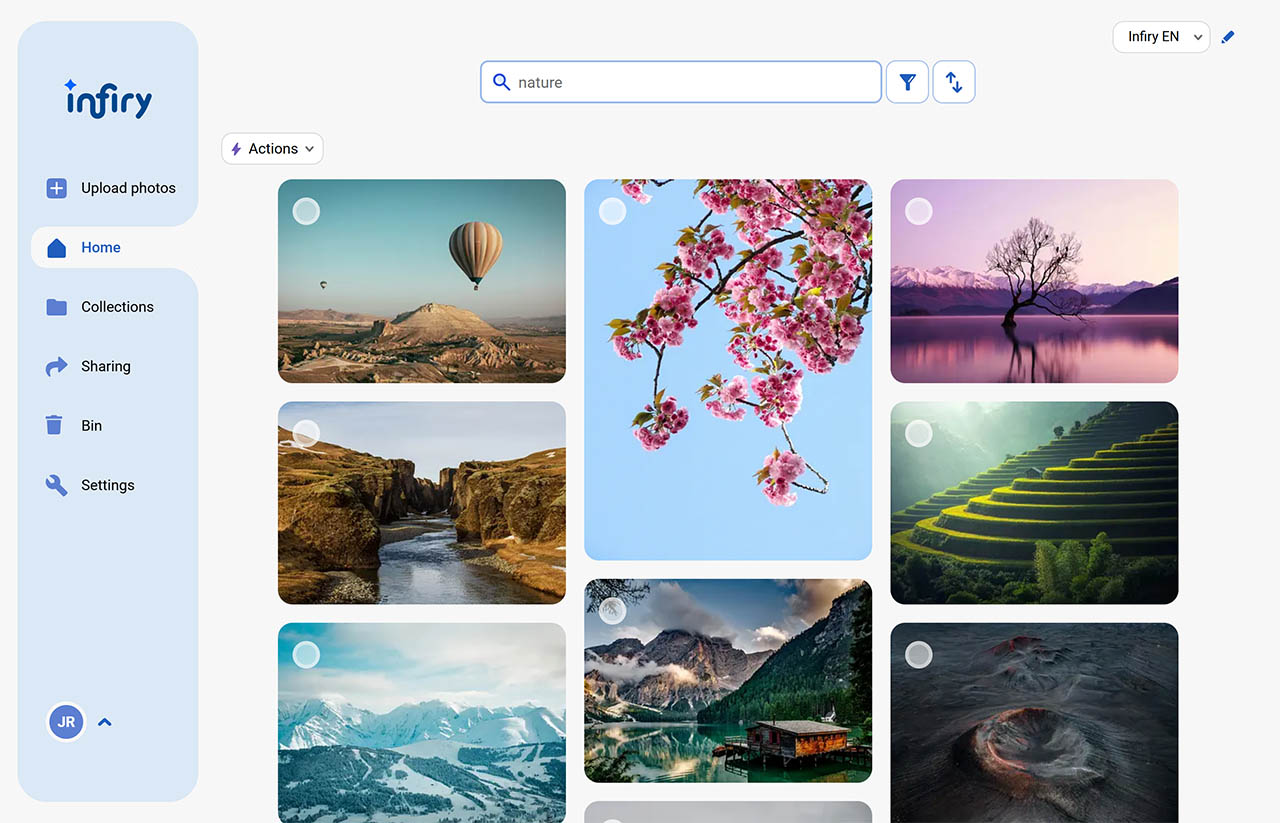
Searching photos in Infiry is a breeze. Whether you recall the location, photographer, or just a color, our advanced algorithms will find the right photos in no time. Search by various criteria and discover the simple yet speedy search experience you’ve always dreamed of.
And it can do so muuuuuuu ch more
English Language Support
Our software is fully in English, so you can use it without any language barriers. Additionally, we provide English customer support, detailed video tutorials to help you get the most out of our product.
How Infiry Improves Workflow
01.
Better Team Collaboration
Keep the entire team on the same page – all photos in one place, easily accessible and neatly organized. Share collections with just a few clicks by entering an email. No downloading or forwarding, collaboration has never been simpler.
02.
Time Savings
Find exactly the photo you’re looking for in seconds thanks to AI-generated keywords and contextual descriptions. Faster searching means more time for what truly matters.
03.
Improved Communication with Clients
Forget lengthy processes for sharing photos. Infiry lets you professionally present images to clients in seconds. Clients appreciate the simplicity and speed, while your team gains more time for what they do best.
04.
Increased Productivity
Eliminate unnecessary steps; everything from descriptions to sharing is designed for maximum efficiency. Your team has constant access to the latest version of photos and can focus on creative work. Simple management means less stress and more results.
05.
Grows with Your Team
Growing? No problem. Add additional users or expand storage in just a few clicks in the administration. Infiry adapts to your needs and supports you at every stage of your growth.
How It Works
Upload Photos from Your Device
Simply drag and drop your photographs into our system and start organizing them immediately. Our intuitive platform ensures easy uploading and instant access to your shots.
- Up to 1,000 photos in one upload
- Supported formats: JPG, PNG, TIFF
- Upload from computer, tablet, or mobile
Photos Only Tell Half the Story. Fill in the Rest!
Each shot gets a new dimension when you add details like date, place, description, photographer, department, or even a collection you want to place photos in right away. Our platform lets you add all important information for better context and organization. You can easily copy all or selected descriptions from one photo to others, speeding up the entire describing process.
- Option to describe all uploaded photos
- Copying individual descriptions
- Adding photos to themed collections
No More Chaos: Find Your Photos Easily and Quickly
Infiry lets you search photos using keywords, filters, and sorting. Simply type in what’s in the photo or from which event it came. Infiry also supports filtering, allowing you to filter photos by photographer, place taken, orientation, or their dominant colors. You can also store photos in themed collections or add them to your favorites, making them easier to find later.
- Searching and sorting
- Filtering by photographer, place, dominant colors, and more
Choose the Found Photos or Their Collection
Found the photos you were looking for? Use the simple selection to pick them and download, or go straight to the photo collection. You can download photos in original size, smaller size (like for the web), or with a watermark.
- Download individual photos, selected photos, or an entire collection
- Download in various sizes
- Download photos with a watermark
Start with Infiry in a Few Easy Steps
See how easily and quickly you can start using Infiry

Frequently Asked Questions
Start Using Infiry free
- Free plan
- No commitments and no payment details
- Access to all features
- Option to upgrade to a higher plan
- No installations
- All in a few minutes
